Pattern Keeper vs Markup R-XP: Which Cross Stitch Tracker? (2026)
Pattern Keeper vs Markup R-XP: two trackers compared on price, devices and sync, and why the complete StitchThis platform is the better answer.
Quick answer: Pattern Keeper and Markup R-XP are trackers: each helps you mark off a chart on a phone or tablet. Pattern Keeper is the cheaper one, on Android only; Markup R-XP adds iPhone, iPad and scanned charts. StitchThis is a different kind of answer: tracking on every device you own, connected to editing your charts, your floss stash, buying and making patterns, and other stitchers.
People comparing these two usually want one thing: a better way to stitch the charts they own. A tracker solves part of that. Below is what each app does, based on its own site, help pages and store listing (checked November 2026), and why a complete platform is the better answer.
StitchThis vs Pattern Keeper vs Markup R-XP
| StitchThis | Pattern Keeper | Markup R-XP | |
|---|---|---|---|
| Tracking | |||
| Price | Free for 2 imported charts; Stitch Tracker $19.97/yr | About $9 once after a 1-month trial | $19.99/yr after a 14-day trial |
| Devices | Any browser: PC, Mac, Chromebook, iPad, iPhone, Android | Android (computers only through an emulator) | iPhone, iPad, Android (Apple Silicon Mac listed as "not verified") |
| Digital PDF charts | Yes | Yes, best with supported designers | Yes |
| Scans and photos of paper charts | No | Limited | Yes |
| Backstitch | From OXS files, or drawn by hand (Maker) | No | Drawn by hand, not counted in progress |
| Parking | Yes (Stitch Tracker or Maker) | Yes | Yes |
| Stats and finish date | Yes | Stitch counts, no finish date | Yes |
| Automatic sync | Yes | No | No |
| The rest of the hobby | |||
| Edit the chart | Yes | No | No |
| Floss stash and shopping list | Yes | No | No |
| Project library | Yes, grouped by status | Chart list | Yes, with categories |
| Buy patterns | Yes | No | No |
| Make your own patterns | Yes | No | No |
| Built-in community forum | Yes | No | No |
On tracking, each app has its strengths. Of the three, only StitchThis connects tracking to the rest of the hobby.
Our verdict
- Android and a one-time purchase: Pattern Keeper.
- A pattern that only exists on paper or as a scan: Markup R-XP.
- More than one device, a computer, fixing an imported chart, or the rest of the hobby: StitchThis.
With a tracker alone, moving your progress between devices means exporting and importing files, the chart stays as it came, and your floss lives in a drawer. StitchThis connects them: no exporting files to switch devices, imported charts you can edit, and your floss stash in the same account as your projects. That's why it's the better answer.
Pattern Keeper in brief
- About $9 once after a one-month trial, per its pricing page.
- Android only. Its FAQ says iOS is "not yet" available, and on a computer its help suggests an Android emulator.
- No automatic sync: its FAQ says you export progress on one device and import it on the other.
- Best with supported designers. It calls itself a beta that "will not work with" some charts, and keeps a list of supported designers. Backstitch and fractional stitches "are not supported", per its Play listing.
Markup R-XP in brief
- $19.99 a year after a 14-day trial on the US App Store; iPhone, iPad and Android.
- Reads scans and photos of paper, book and magazine charts, per its site, as well as PDFs.
- No automatic sync: its user guide moves projects by exporting and restoring .rxp files.
- Backstitch drawn by hand on layers, which its layers help page says "do not alter stitch counts or progress statistics".
StitchThis: tracking connected to the rest of the hobby
StitchThis runs in the browser on a Windows PC, Mac, Chromebook, iPad, iPhone or Android phone, with an app in development. Everything below lives in one account and follows you from device to device.
Stitch your charts on any device
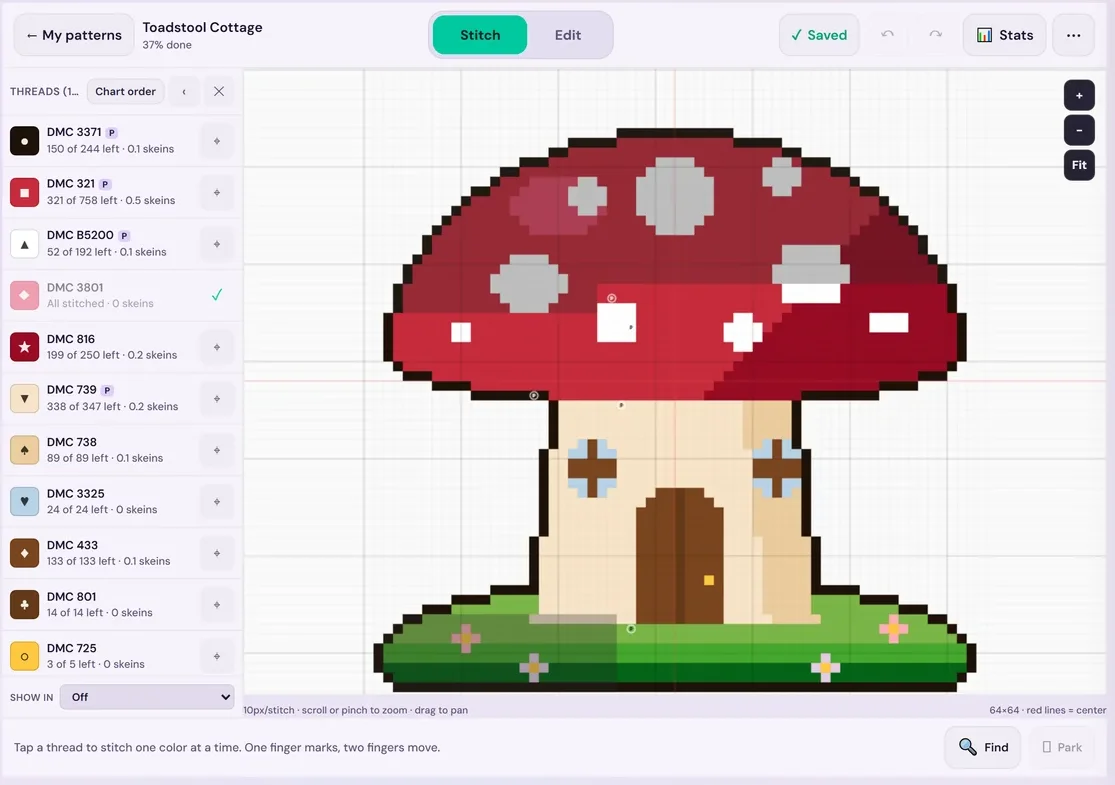
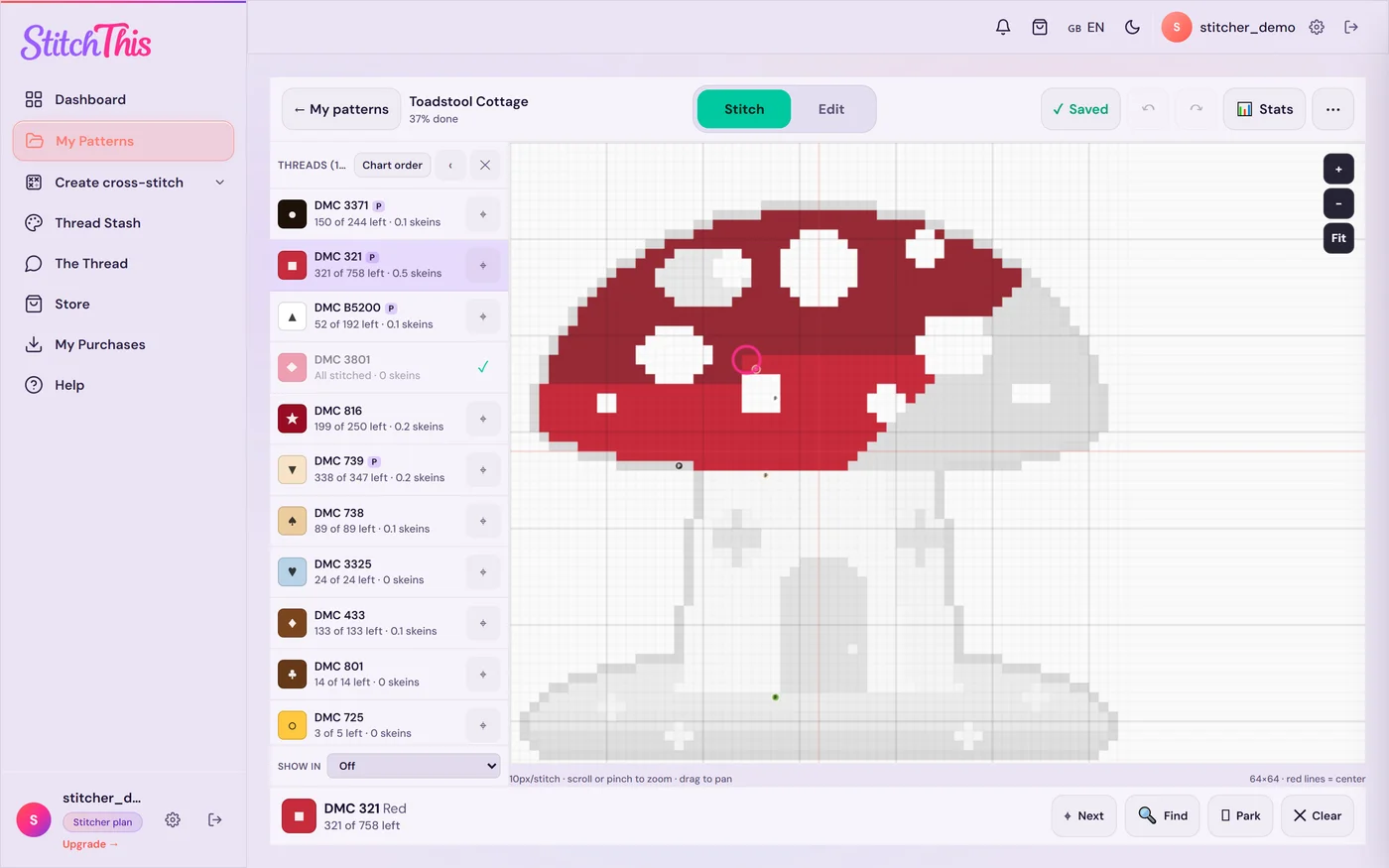
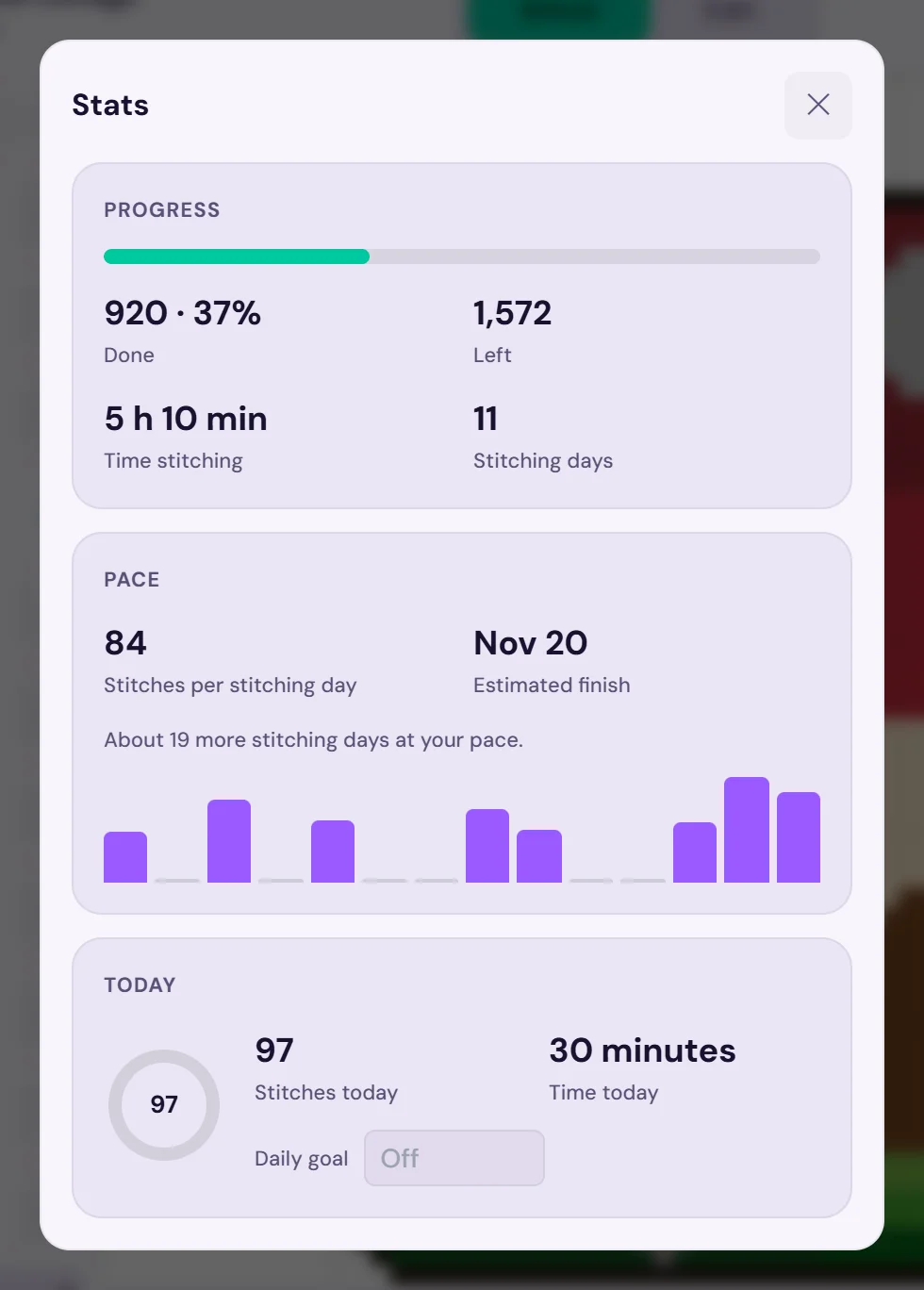
Import the PDF or OXS chart you own, check it on the review screen, and start marking: tap a stitch, drag a row, or long-press for a 10×10 block. Every stitch syncs as you mark it, so the iPad, the laptop and the phone always agree, and "Save to this device" lets you stitch offline. Highlight a thread and the others gray out; Next jumps to its next stitch. Needle parking (with Stitch Tracker or Maker) keeps one marker per thread, and stats show percent done, pace and an estimated finish date. A red-green colorblind preview and high-contrast symbols help when shades are hard to tell apart.
Fix the chart before you stitch it
Plenty of patterns sold online now are generated by AI, with stray single stitches and colors that don't hang together. Correct the digital chart itself, imported ones included: Change All swaps every stitch of one color for another (handy when you don't own a thread), Fill recolors an area, and Draw fixes stitches one at a time. For example, if a face is speckled with three near-identical tans, Change All turns two of them into the third, and you stitch one smooth color. If the chart calls for a thread you don't have, swap it for one already in your stash.
Know your floss
The floss stash tracker keeps your threads by brand and number, with skein counts and where each one is stored (fill it from a CSV or a photo of your skeins). Every pattern has a floss shopping list, and when you mark a project complete you can deduct the floss it used.
See every project at a glance
My Patterns groups every chart into In progress, Not started and Completed, with a progress bar on each, so you always know which WIP is closest to done. See the project tracker.
Find or make your next pattern
Browse the pattern shop, where bought patterns open straight in the tracker, or turn a photo into a pattern with the cross stitch pattern maker, or draw one from scratch.
Stitch with other stitchers
Share a finish, ask about a tricky chart or swap tips in the community forum.
What it costs (as listed in Nov 2026): free for 2 imported charts and 2 patterns in progress at a time, with no time limit. Stitch Tracker is $19.97 a year for unlimited imported charts, unlimited patterns in progress and needle parking; cancel anytime in Settings and keep every chart. Maker ($5.99 a month or $59.99 a year) adds the design tools.
Good to know: the PDF importer reads full stitches from digital PDFs, not scans or photos of paper charts. See which cross stitch PDFs work with tracker apps, StitchThis vs Pattern Keeper and StitchThis vs Markup R-XP.
Start free with StitchThis: import the chart you'd have opened in Pattern Keeper or Markup R-XP, and bring the rest of the hobby with it.
Frequently asked questions
Is Pattern Keeper or Markup R-XP better? Pattern Keeper is cheaper on Android; Markup R-XP runs on iOS too and reads scans. Both are trackers only. StitchThis tracks your charts on every device and covers the rest of the hobby: editing charts, floss, projects, patterns and community.
How much does Markup R-XP cost? Is it free? It isn't free. After a 14-day trial it's $19.99 a year on the US App Store, or £14.99 a year on its own site, as listed in November 2026.
Is Markup R-XP a subscription? Yes. It moved from a one-time purchase to a yearly subscription.
Does Markup R-XP sync between devices? Not automatically, as far as its documentation shows. You export a project as an .rxp file and restore it on the other device. StitchThis syncs automatically through your account.
Does Pattern Keeper work on iPad? No. Its FAQ says iOS is "not yet" available. Markup R-XP and StitchThis both run on iPad.
Which is better for backstitch? Markup R-XP lets you draw backstitch on a layer, though it doesn't count toward progress; Pattern Keeper doesn't support it. StitchThis imports backstitch from OXS files and lets you draw it on Maker.
Can I move my projects from Pattern Keeper or Markup R-XP? There's no documented direct transfer, so expect to import the PDF again and re-mark your progress. In StitchThis, block marking makes catching up on a half-finished project quick.
The short version
Pattern Keeper and Markup R-XP are mobile trackers that move progress between devices by hand. StitchThis is the complete cross stitch platform: patterns you buy, make or import; an editor to fix them; a tracker that follows you from iPad to laptop to phone; your floss stash and shopping list; and a community of stitchers. Start free with StitchThis and bring your whole hobby into one place.
Вече имаш схема като PDF?
Качи я в StitchThis и бродирай по нея на екран: приближавай всяка част, отбелязвай бодовете в движение и продължавай откъдето спря.
Импортирай PDF безплатноБезплатен план: пази 2 импортирани схеми и проследявай 2 схеми едновременно, без срок. Не е нужна карта.