How to Manage Multiple Cross-Stitch WIPs: Rotation Systems That Actually Work
How to manage multiple cross-stitch WIPs: rotation systems by week, hour or mood, project bags, parking, and keeping progress on every project so none of them stall.
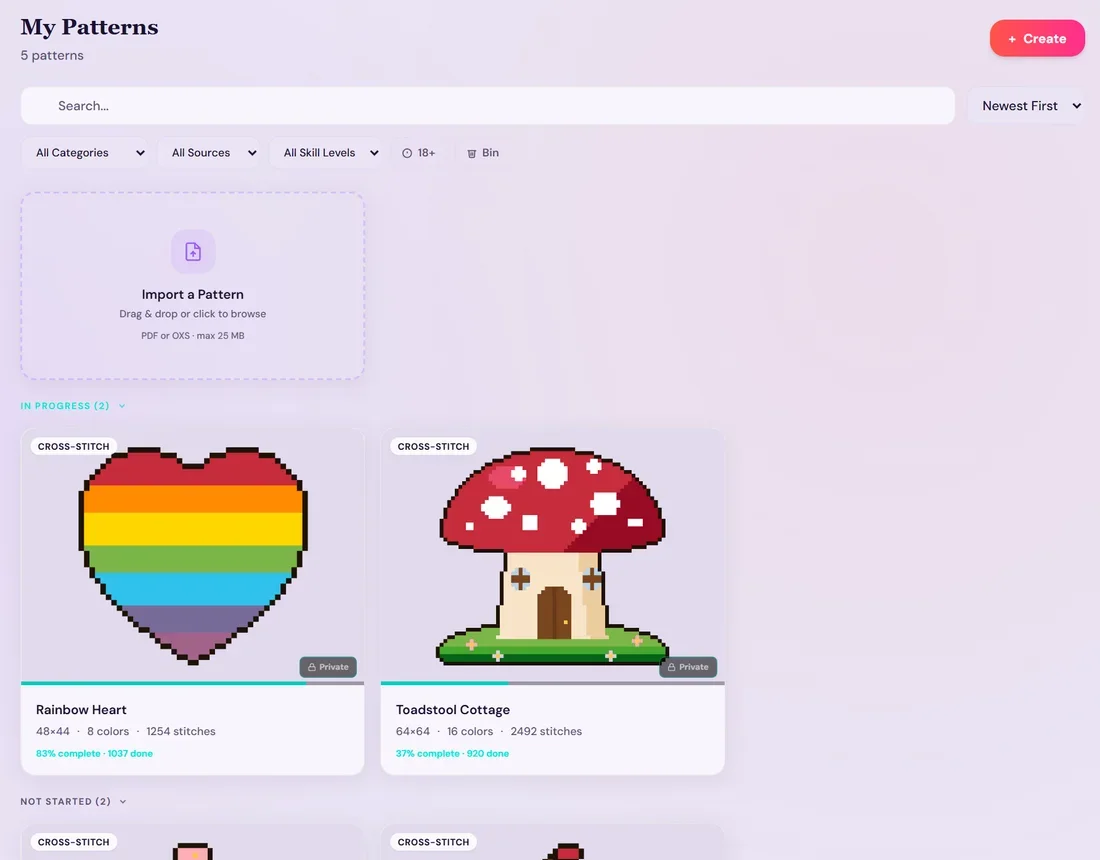
Quick answer: Start with three to five active WIPs, choose one rotation rule (by week, hours or mood) and keep each project ready to resume. Gather its supplies and record where you stopped. StitchThis keeps each project's marked stitches, parked-thread markers and progress together, synced across your devices.
Almost every stitcher ends up with more than one work in progress, and with it a mountain of paper patterns and tangles of floss, until they're spending more time taming the chaos than actually enjoying the hobby. You finally find time to stitch, then spend it finding the right page, checking what you've finished and counting your way back to the next stitch. A coffee ring, a torn fold or a row highlighted by mistake makes it worse, and sooner or later a page goes missing, along with any record of where you stopped.
StitchThis takes the paper out of it. Every chart and its saved progress live in one place, so each WIP has a clear place to restart. And it's more than a tidy place to keep patterns: it's a platform for the whole process, from finding or making a pattern and fixing the chart, to stitching it on any device, keeping your floss stocked, and sharing your progress with other stitchers.
This guide covers how many WIPs to keep, the rotation systems stitchers actually use, how to keep each project ready to resume, and how to see which ones are moving.
Why stitchers keep several WIPs (and when it's a problem)
Running several projects is a good idea when they do different jobs:
- A focus project: large, detailed, lots of color changes, best stitched in good light with full attention.
- A portable project: small enough for a bag, simple enough for a waiting room.
- A comfort project: big blocks of color you can stitch while watching TV.
- A deadline project: a gift or a stitch-along with a date on it.
It becomes a problem when several WIPs do the same job, when you can't remember what's in each bag, or when a project hasn't moved in a year but still feels "active." The first step is an honest list. Our guide to organizing cross-stitch patterns includes an inventory you can use, with a status column for each chart.
Switch WIPs in seconds: let StitchThis remember
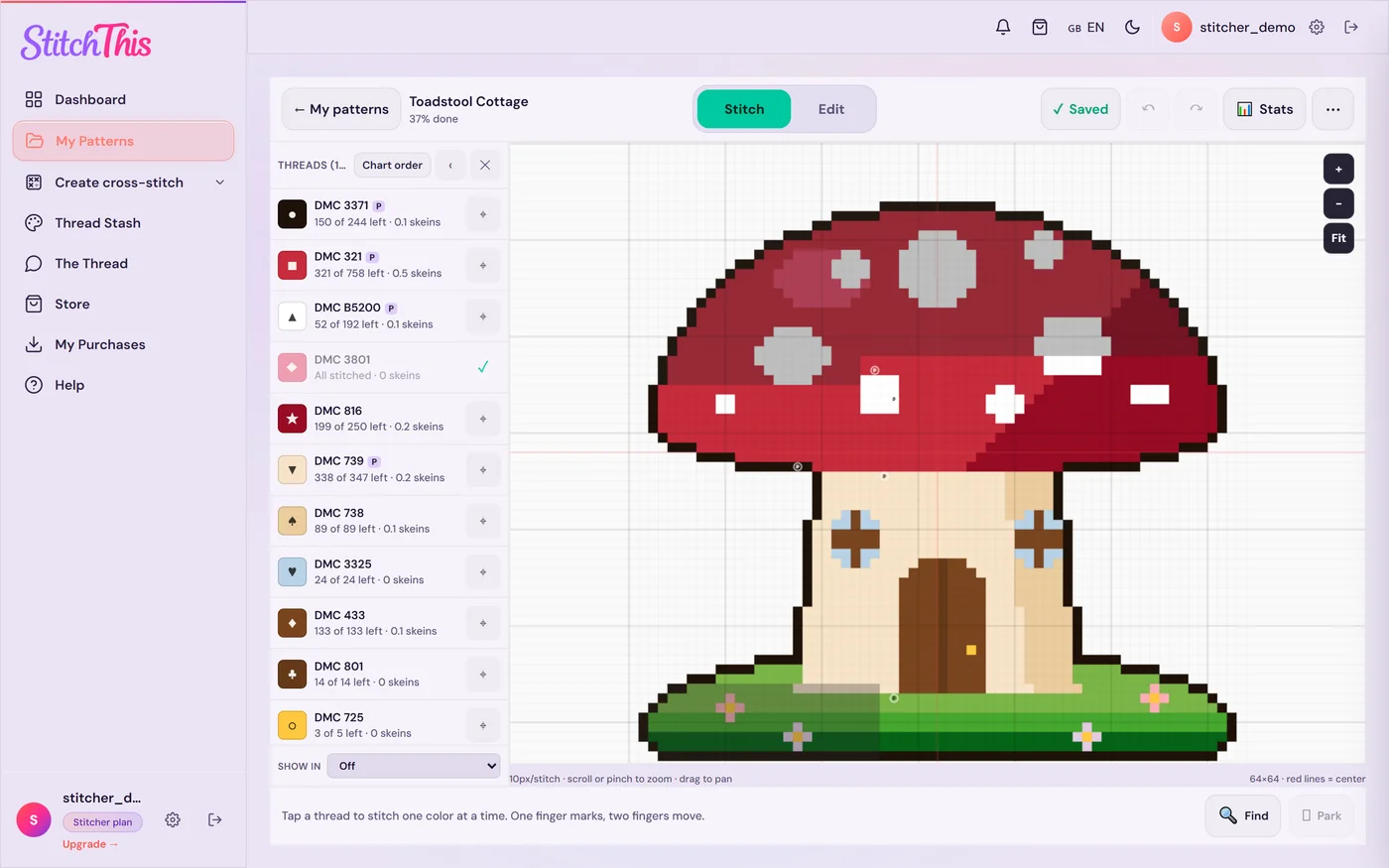
The hardest part of running several WIPs is the switch: finding where you were, which needles were parked, how far along it is. StitchThis keeps all of it, for every project, in one place:
- Pick up exactly where you stopped. Every pattern keeps its own marked stitches and parked needles. The dashboard opens on "Continue where you left off", one tap back into your last project.
- See every WIP at a glance. My Patterns groups your charts into In progress, Not started and Completed, with a progress bar and percent done on each.
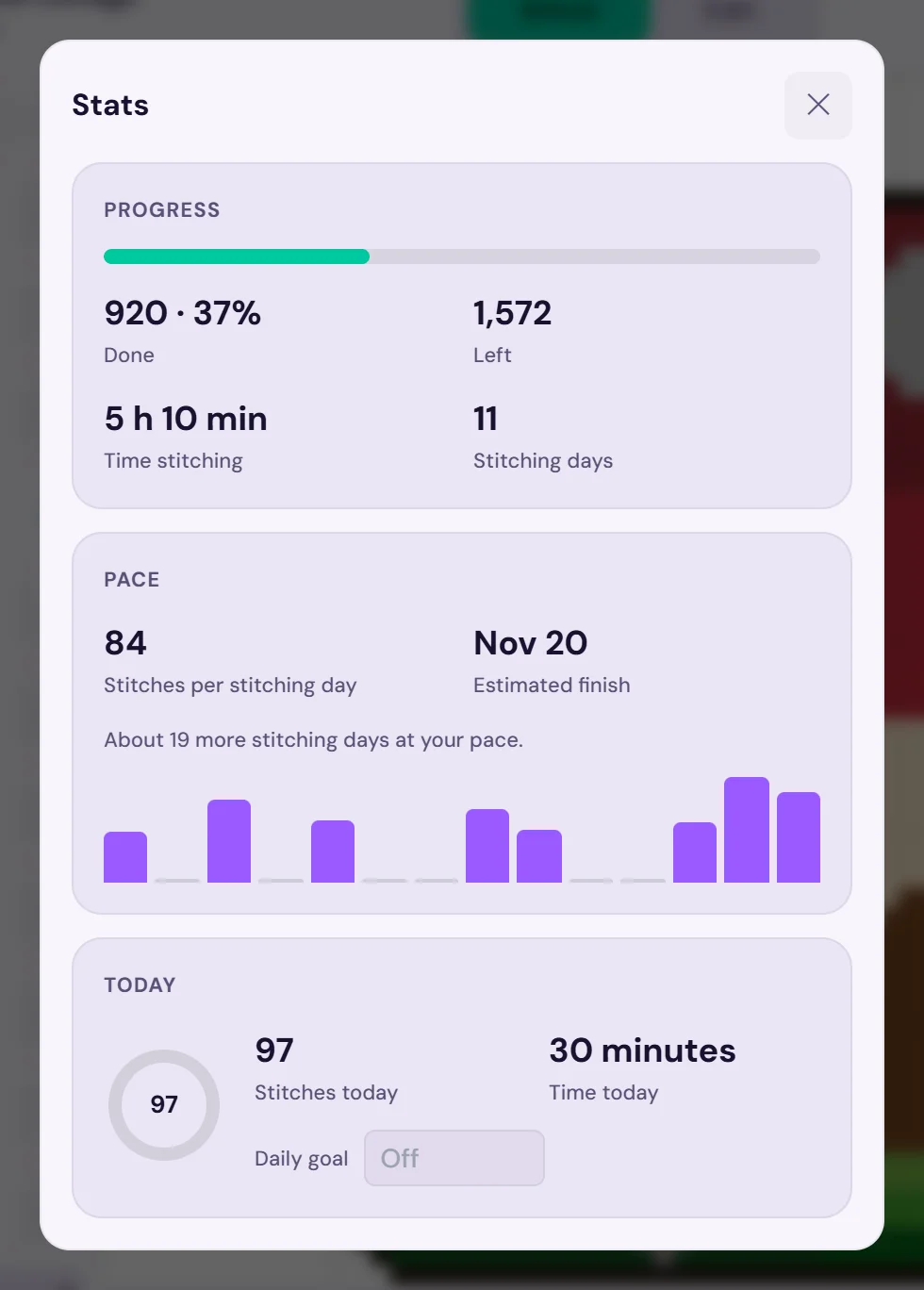
- Know which ones are moving. Each project records its stitching time, pace and an estimated finish date that follows how often you really stitch it, so a gift deadline is never a guess.
- Any device. Progress syncs between your phone, tablet and computer, so the portable project and the TV project don't need to live on the same device.
- The rest of the hobby, alongside. Your floss stash sits in the same account as your projects, and the community forum has a WIP board for sharing progress.
Import the charts you already own as PDF or OXS files, or make your own. The free plan has two separate limits: 2 patterns in progress at a time (pausing one frees its spot, which fits a "two active, the rest parked" rotation) and 2 imported PDF or OXS charts kept at a time (finishing or deleting one frees its slot; patterns you make yourself never count). If you rotate more than two, the Stitch Tracker pass ($19.97 a year, renews every year; cancel anytime and keep every chart) makes patterns in progress and imported charts unlimited, and Maker includes the same. Try StitchThis free with your current projects, or see the cross stitch project tracker.
Decide your WIP cap
Pick a number of active WIPs, and treat anything beyond it as "parked." Try three to five as a starting point: enough variety for every mood, few enough that each one moves. Adjust once you see how it goes.
Parked doesn't mean abandoned. It means the project is packed up, its place recorded, and it's off the rotation until something finishes. When a WIP finishes, you choose one to bring back or one new start. That one rule does more to stop WIPs piling up than any storage system.
Rotation systems that work
There's no single right system. Choose the one that matches how you stitch, then keep it simple enough to follow on a tired evening.
| System | How it works | Best for | Watch out for |
|---|---|---|---|
| One per week | Each WIP gets a full week, in order | Steady progress on every project | A week can feel long on a project you're not enjoying |
| Day of the week | Monday is the sampler, Tuesday the gift, and so on | Stitchers with a regular routine | Missed days throw the order off |
| By hours | Each WIP gets a set amount of time (say 10 hours) before you move on | Fairness between big and small projects | You need to time your sessions |
| By milestone | Stitch until you finish a page, a color or a block of the chart | Big charts where reaching a milestone is motivating | Some milestones take much longer than others |
| By mood | Pick whichever project suits tonight, from your active list only | Relaxed stitchers who resist schedules | Hard projects can get skipped forever |
| Focus plus breaks | One main project, with a small project for when you need a change | Finishing one big piece | The "break" project can quietly become the main one |
One project per week
The most straightforward rotation. Line up your active WIPs and give each a week, in order. Its strength is fairness: everything moves a little every few weeks. If a week feels long, try half-weeks.
A set number of hours
Give each WIP the same amount of stitching time, such as 10 hours, before rotating. This works well when projects are very different sizes, because the small one finishes quickly and frees a slot. It does need a timer, or StitchThis, which records each project's stitching time as you mark stitches.
By milestone
Rotate when you reach a natural stopping point: the end of a chart page, one color finished, or a set number of 10×10 blocks. Milestones feel good to reach, and they leave the project at a clean place to resume. Avoid milestones that depend on a single color in a confetti-heavy chart, where "one color" can mean hundreds of scattered stitches.
By mood, with guardrails
If schedules spoil the fun, pick by mood, but only from your active list, and add one guardrail: any WIP that hasn't been touched in a month goes first next time. That keeps the difficult project from sinking to the bottom.
Keep every project ready to pick up
Rotation only works if switching is quick. The cost of switching is what kills most WIP systems: if picking up a project takes 30 minutes of finding things and counting squares, you'll stick to the one already in your hands.
One project bag per WIP
Give each active WIP its own bag or box with everything in it: fabric on its hoop or frame, the chart (or a note of where the digital chart lives), the floss for that pattern, a needle minder, scissors and a threader. Clear or mesh bags let you see what's inside. The floss stash organization guide covers organizing floss by project, and how to keep project floss and your main stash from drifting apart.
Take the fabric off the hoop
When a WIP goes back on the shelf for more than a few days, take it off the hoop. Hoops left on can leave creases and marks that are hard to press out. Scroll frames and Q-snaps are kinder for long rests, but loosening them doesn't hurt.
Park your needles
If you stitch with the parking method, leave threaded needles parked on the fabric where each color will be used next. When you come back, the needles show you where to work. On a long rest, note which colors are parked where, or mark each parked needle in StitchThis, which keeps a marker on the chart for every one.
Record exactly where you stopped
This is the step most people skip. Before you put a WIP away, mark the chart: the last block finished, the row you were on, any stitches you skipped. A highlighted working copy does this on paper; StitchThis does it as you stitch. Our guide on how to track cross-stitch progress compares highlighters, wipe-off markers, spreadsheets and apps.
See which WIPs are actually moving
A rotation is easier to stick to when you can see it working. For each active project, keep three numbers (StitchThis shows all three on each project's Stats):
- Percent done. Stitches done divided by total stitches.
- Pace. Stitches per stitching day (or per hour).
- Estimated finish. Stitches left divided by pace.
A quick example: a 24,000-stitch piece with 6,000 done is 25% complete. If you average 400 stitches on the days you stitch it, the remaining 18,000 stitches take 45 stitching days. Say you stitch five days a week, shared equally across four projects: this one gets about 5 ÷ 4 stitching days a week, so 45 stitching days takes 45 × 4 ÷ 5 = 36 weeks, roughly eight months. That's useful to know before you promise it as a gift, and a good reason to move a deadline project to "focus" for a while.
Numbers also help you decide what to retire. A WIP at 3% that you dread picking up isn't a failure; it's a candidate to park, or to let go of. Some stitchers keep a small "retired, no regrets" list for exactly this.
Use the community for accountability
Many stitchers keep WIPs moving with a little outside accountability: monthly progress posts, WIP challenges where you aim to finish a list of projects over a year, or a regular stitch night. The WIP board in the StitchThis community forum is made for exactly that: post a progress photo, get encouragement, and show off the finish in Show and Tell. For more places, our guide to finding a cross-stitch community compares the places stitchers share progress.
Frequently asked questions
How many cross-stitch WIPs is too many? There's no fixed number. It's too many when projects stop moving or when you can't remember what's in each bag. Three to five active WIPs, with the rest parked, is a good starting point.
What's the best WIP rotation system? The one you'll follow. One project per week is the simplest and fairest. Rotating by hours suits projects of very different sizes, and rotating by mood suits people who dislike schedules, as long as untouched projects get priority.
How do I remember where I stopped on a WIP? Mark it before you put it away: highlight the last finished stitches on a working copy and leave parked needles in place, or let StitchThis save your place as you stitch and show it on any device.
Should I leave my cross stitch in the hoop between sessions? Not for long. Take fabric out of a hoop when a project will rest for more than a few days, to avoid hoop marks. Scroll frames and Q-snaps are gentler for long rests.
Can I track several cross-stitch projects in one app? Yes. StitchThis keeps each project's progress, parked needles and stats separately, in one library. The free plan tracks 2 patterns at a time; Stitch Tracker and Maker remove the limit. If you're comparing options for a tablet, our iPad app roundup covers the alternatives.
My patterns are PDFs in different places. Can I still use an app? Usually. Most purchased charts are PDFs made with pattern software, which trackers can read. If a chart is in another format, the pattern file formats guide explains how to get to a PDF, and the PDF pattern tracker page shows which PDFs import well.
Finish more by switching less painfully
Multiple WIPs aren't the problem; slow switching is. Cap your active list, pick one rotation rule, and make every project ready to pick up in a minute. If you'd rather it all lived in one place, StitchThis is the full cross stitch platform: every WIP's place, parked needles and finish date on any device, your floss stash, patterns to buy or make next, and a community to cheer you on. Set up your WIPs in StitchThis free. For the basics of counting and keeping your place on any single chart, the beginner's guide to reading a pattern is a good refresher.
Već imaš shemu u PDF-u?
Prenesi je na StitchThis i vezi po njoj na zaslonu: povećaj bilo koji dio, označavaj križiće dok vezeš i nastavi tamo gdje je vezenje stalo.
Besplatno uvezi svoj PDFBesplatni plan: zadrži 2 uvezene sheme i prati 2 sheme istodobno, bez vremenskog ograničenja. Kartica nije potrebna.