How to Organize Cross-Stitch Patterns: Paper Binders, PDF Folders and Digital Libraries
How to organize cross-stitch patterns: binders and sheet protectors for paper charts, folders and file names for PDFs, and a digital library that tracks progress.
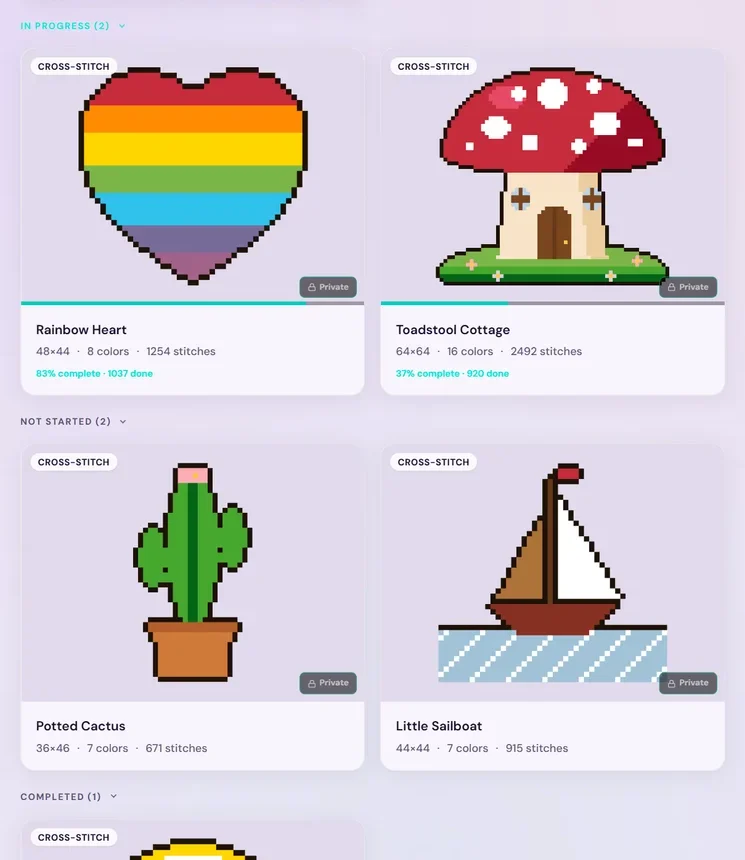
Quick answer: Organize cross-stitch patterns in three layers. Keep paper charts in binders with sheet protectors, sorted by status (stitching, next, someday, finished). Keep PDFs in one master folder with the same status subfolders and a consistent file name. Then keep one master list that shows every pattern and how far along it is, or let StitchThis be that list for your digital charts: PDF and OXS patterns in one library, with your progress on each, on any device.
Most stitchers don't set out to own two hundred patterns. It happens one kit, one magazine, one Etsy sale and one designer's free chart at a time. Then one evening you want to start the fox you bought last spring, and you can't remember whether it's in a binder, an email, your downloads folder, or a shop account you've forgotten the password to.
Paper adds its own problems: a chart with a coffee ring across the key, a page torn at the fold, a working copy highlighted by mistake, a binder that's grown too heavy to carry to stitching group. PDFs don't stain, but they scatter across downloads folders, inboxes and shop accounts.
StitchThis brings your digital charts together. PDF and OXS patterns are saved to your account and open on your phone, tablet or computer, sorted by where you are with each one. A scanned PDF it can't read is kept as a view-only copy, and paper originals still need a shelf, but the charts you stitch from no longer stain, tear or scatter. And it's more than storage: it's a platform for the whole hobby, from buying or making a pattern and fixing the chart, to stitching it on any device, keeping your floss in check and sharing your progress with other stitchers.
This guide walks through how to get a pattern collection under control without spending a whole weekend on it: the one-place library, a one-time inventory, a system for paper, and a system for PDFs.
Why pattern collections get out of hand
Patterns arrive from more places than almost any other hobby supply:
- Kits, where the chart lives in the box with the fabric and floss.
- Magazines and leaflets, often several charts per issue.
- PDFs from Etsy, designer websites, newsletters and pattern clubs.
- Free charts saved "for later" from blogs and social posts.
- Software files, such as OXS files, if you or a friend design charts.
Each source has its own storage habit, so the collection ends up split across a shelf, a drawer, three inboxes and two devices. The fix isn't a fancier binder. It's deciding on one sorting rule and using it in every place a pattern can live.
The one-place answer: a StitchThis library
Folders and binders store patterns. They don't tell you how far along each project is, which one you touched last, or whether you have the floss. StitchThis keeps all of that together:
- Every pattern in one library. Import the PDF or OXS charts you own and they sit on My Patterns alongside patterns you've made yourself and patterns you've bought in the StitchThis shop. Search by name, sort by date or name.
- Sorted by status for you. My Patterns groups charts into In progress, Not started and Completed, each card showing its percent done, so "what am I stitching next" is a glance. Your own filing system can go finer: "Next up" and "Someday" both show as Not started in StitchThis (there are no custom folders or tags yet), so keep that split in your inventory list.
- Open any chart and stitch it. Mark stitches on your phone, tablet or computer, with your place saved and synced. A wrong mark is one tap to undo, unlike a highlighter.
- Fix the chart, not just store it. Edit any chart, imported ones included: swap a color you don't own with Change All, or clean up stray stitches.
- Your floss alongside. The floss stash tracker keeps your threads by brand and number with skein counts and where each is stored, so you can check a pattern's key against what you own.
- Other stitchers. Talk designers and charts, or ask for a pattern you can't find, in the community forum.
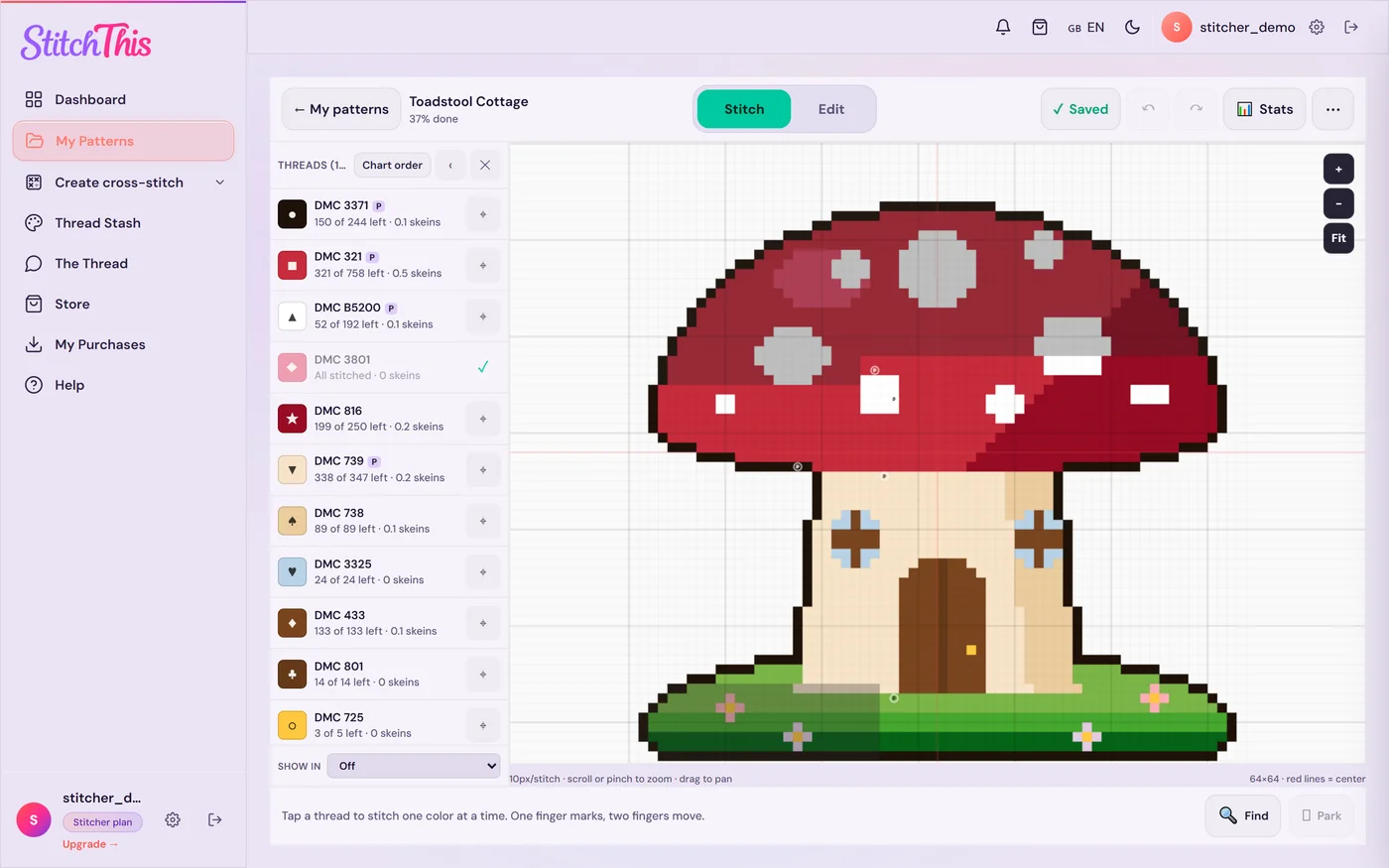
Two honest limits: there are no custom folders or tags yet, and scanned or photographed paper charts can't be read stitch by stitch, so keep your binders for those. The free plan keeps 2 imported charts at a time (finishing or deleting one frees its slot; patterns you make or buy never count), and the Stitch Tracker pass ($19.97 a year, renews every year; cancel anytime and keep every chart) makes imports unlimited. See the cross stitch project tracker, or start your library free with the two charts you're stitching right now.
The rest of this guide covers the paper and PDF side, for the charts you keep outside an app too.
Step 1: Take a one-time inventory
Before you buy a single sheet protector, make a list. A simple spreadsheet is enough. One row per pattern, with these columns:
| Column | Why it helps |
|---|---|
| Pattern name | What you'll search for |
| Designer | Re-downloads, updates and errata come from them |
| Where it lives | Binder 2, PDF folder, kit bin, email |
| Format | Paper, PDF, OXS, kit |
| Size in stitches | Tells you fabric size and how big a commitment it is |
| Status | Stitching, next up, someday, finished |
| Where you bought it | So you can download it again if a file goes missing |
Don't try to do two hundred patterns at once. Start with what matters this month: your current WIPs and the next few you want to start. Then add the backlog in batches, say one binder or one shop account per session, with a timer. Don't stop to admire patterns or reorganize anything yet. The goal is to know what you own. Most stitchers find duplicates (the same freebie saved twice), patterns they no longer want, and at least one chart they forgot they bought.
Step 2: Organize paper patterns
Binders and sheet protectors
A two- or three-inch ring binder with clear sheet protectors is still the best home for paper charts. Protectors keep pages clean, stop corners from tearing, and let you slide a chart out to stitch from it. Use one protector per page, and keep a pattern's cover page, chart pages and key together in order.
Sort binders by status first, then by whatever you browse by (theme, season or designer). A practical set:
- Stitching now: the charts for your current projects. Keep this binder thin and close to your chair.
- Next up: what you'll start when something finishes.
- Someday: everything else, by theme or designer.
- Finished: charts you've stitched, for reference and for remembering which floss you used.
Use tabbed dividers and a printed index at the front of each binder (the inventory spreadsheet, filtered by binder, works well).
Magazines and leaflets
Don't keep whole magazine stacks if you only want two charts from each. Either remove the pages you want into protectors, or keep the magazine and add each chart you care about to your inventory with the issue and page number.
Kits
Keep a kit's chart with the kit in a zip bag or project box until you start it. Once you start, the chart moves to the "Stitching now" binder and the kit's floss and fabric go into a project bag.
Working copies
Many stitchers mark up a copy and keep the original clean. Most designers allow a personal working copy, but check the terms in the pattern, and never share copies. If you work from a printed PDF that's split over several pages, our guide to assembling a multi-page pattern PDF covers trimming and taping without misaligned grids.
Step 3: Organize PDF patterns
PDFs are easier to store and much easier to lose. Three habits make the difference.
One master folder, with status subfolders
Create a single "Cross Stitch Patterns" folder in cloud storage you already use, so it syncs to your phone and tablet and is backed up. Inside it, mirror your binders:
1 Stitching now2 Next up3 Someday4 Finished
Numbering the folders keeps them in order. If you browse by designer, add designer subfolders inside "Someday" only. Deep trees of designer, theme and season folders look tidy for a week and then nobody can find anything.
A consistent file name
Shop downloads arrive with names like pattern_final_v2.pdf. Rename every file the day you buy it:
Designer - Pattern name - 120x160.pdf
Including the stitch count in the name tells you the design's dimensions in stitches at a glance. The finished size depends on your fabric count (120 stitches is about 8.6 inches on 14-count and 6.7 inches on 18-count), so pair it with the cross stitch calculator when you're picking a project to fit a frame. Add the year if a designer reissues patterns. Avoid dates of purchase in the name; your receipts already have them.
Keep the original, and know where to get it again
Never annotate the only copy of a PDF. Keep the original file in its folder and make a separate working copy if you mark it up. In your inventory, note the shop or site where you bought it; most marketplaces and designer stores keep your purchases available to download again from your account.
If a pattern arrived in a format you can't open, our guide to cross-stitch pattern file formats explains what PDF, OXS and the software-specific formats are and how to get to a file you can use.
Step 4: Don't forget the floss
A pattern collection and a floss stash are two halves of the same question: "Can I start this tonight?" Keeping the threads you own in a list means you can check a pattern's key against it before you start or shop. The free StitchThis floss stash tracker does that in the same account as your patterns, and you can fill it from a CSV or a photo of your skeins instead of typing. The floss stash organization guide covers bobbins, bags, labels and keeping an inventory accurate.
Step 5: Choosing a digital library
If you're comparing apps, check four things: which files it opens (most purchased charts are PDFs; some are OXS), whether it reads the chart so you can mark stitches or just shows the page, which devices it runs on, and whether your progress syncs between them. A general PDF reader shows pages but can't count stitches; a spreadsheet holds notes but needs updating by hand. For a side-by-side, see the best cross stitch tracker apps.
If you're a designer packaging your own charts, the other side of this is making a PDF that's easy to organize and track. That's covered in cross-stitch pattern PDF best practices.
A ten-minute monthly routine
Organization slips unless something keeps it current. Once a month:
- File new purchases. Rename new PDFs, move them into "Next up" or "Someday," and add them to your list.
- Move finished charts. Finished projects go to "Finished" with a note of the fabric and floss you used.
- Prune. Delete duplicate freebies and charts you know you'll never stitch. A smaller collection is easier to enjoy.
- Check "Stitching now." If something hasn't been touched in months, decide whether it's really current. Our guide to managing multiple WIPs has ways to rotate projects so none of them stall.
Frequently asked questions
What's the best way to store paper cross-stitch patterns? Ring binders with clear sheet protectors, one page per protector, sorted by status (stitching now, next up, someday, finished) and then by theme or designer. Keep a printed index at the front.
How should I name my PDF pattern files?
Use one format for every file, such as Designer - Pattern name - 120x160.pdf. The designer helps with re-downloads, and the stitch count tells you the design's dimensions in stitches without opening the file.
Should I organize patterns by designer or by theme? By status first, then by whichever you browse by. Status answers "what do I stitch next," which is the question you ask most often. Designer and theme are useful inside the "someday" pile.
How do I keep track of which patterns I've started? A status column in your inventory works on paper. StitchThis does it automatically: My Patterns knows which patterns have stitches marked, how far along each one is, and which are finished. Our guide on how to track cross-stitch progress compares the methods.
Is there an app to organize cross-stitch patterns? Yes. StitchThis keeps imported PDF and OXS charts, patterns you make and patterns you buy in one library, sorted by status with progress on each, in any browser on any device. Whatever you choose, check that it opens your formats (usually PDF), runs on your devices and syncs progress.
What should I do with free patterns I've saved? Treat them like any other pattern: rename, file into "Someday," and add them to your list. Be ruthless about deleting ones you won't stitch. Our roundup of free cross-stitch patterns explains how to tell a good free chart from one that will be miserable to stitch.
A collection you can actually use
The point of organizing patterns isn't a pretty shelf. It's being able to answer "what am I stitching next, and do I have what I need?" in a minute instead of an evening. Sort by status everywhere a pattern can live, keep one list, and if you want the library, the progress, the floss and the rest of the hobby in one place, start your pattern library free in StitchThis.
Onko sinulla jo kaavio PDF:nä?
Lähetä se StitchThisiin ja pistele sen mukaan näytöltä: lähennä mihin tahansa kohtaan, merkitse pistoja edetessäsi ja jatka siitä, mihin jäit.
Tuo PDF ilmaiseksiIlmainen tili: pidä 2 tuotua kaaviota ja seuraa 2 mallia kerrallaan ilman aikarajaa. Luottokorttia ei tarvita.