
For charts you already own
Track your cross stitch PDF patterns, stitch by stitch
“I bought the PDF. Now I’m printing pages, taping them together and losing my place with a highlighter.”
Import the PDF or OXS chart you bought and StitchThis turns it into a chart you can tap: mark stitches as you go, follow one color at a time, and pick up where you left off on your phone, tablet or computer.
Free account · works in your browser · no app to install
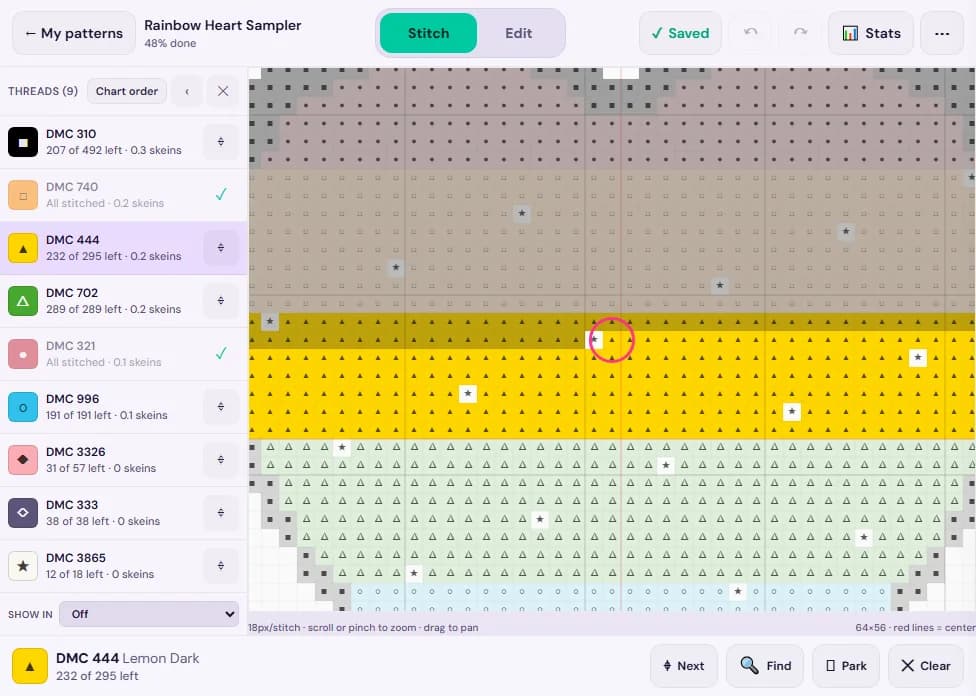
Stitching from a PDF shouldn’t mean paper, tape and guesswork
- Printing 12 pages, taping them together, and still losing the seam between page 3 and page 4.
- Highlighter on paper you can’t un-highlight, and a chart that gets more confusing the further you get.
- Squinting at a PDF on your phone, pinching and scrolling, with no way to mark what you’ve stitched.
- Hunting for every “▲” of one color across the whole chart, one page at a time.
StitchThis keeps the whole chart as one continuous canvas with your progress on it, so the only thing you have to keep track of is the needle.
From a two-page PDF to one chart you can tap
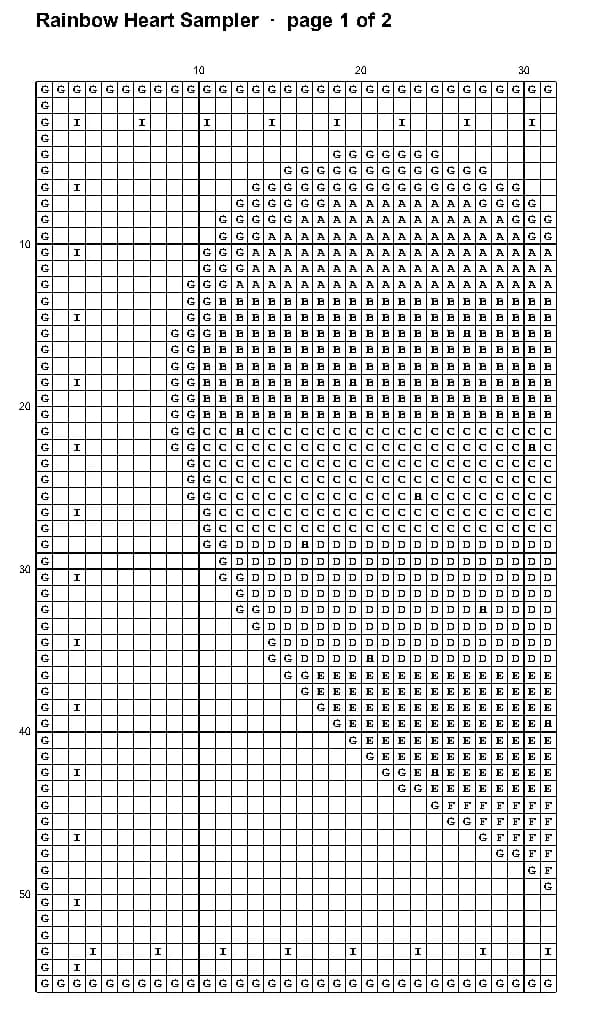
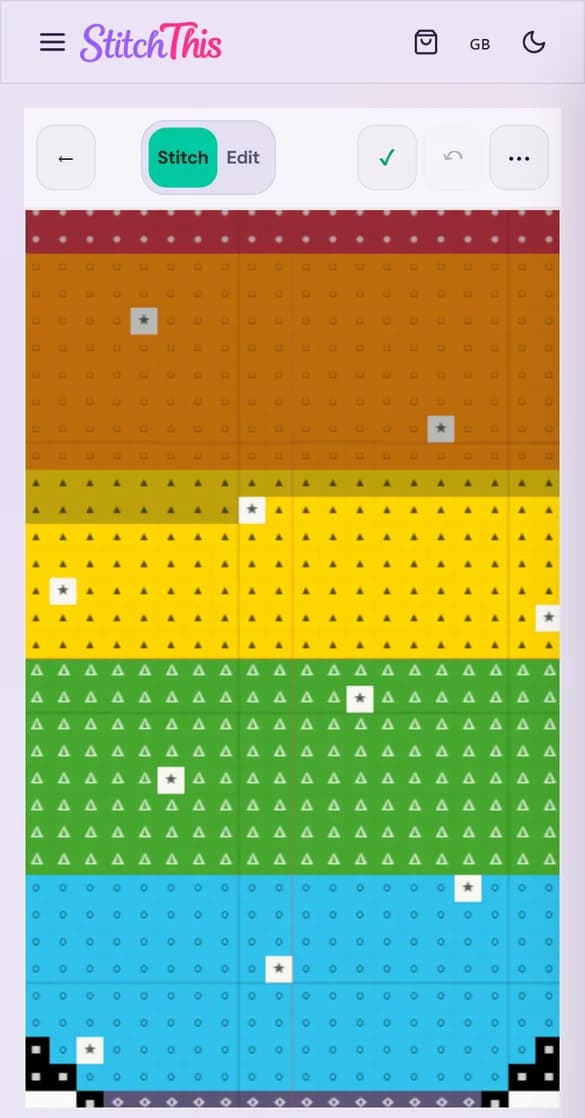
Below is a two-page symbol chart with a separate color key, the kind most designers sell, and the same chart after import. The pages were joined, every symbol became a stitch, and each thread came from the key: DMC 310, 321, 444 and the rest, not a guess from the colors.
How it works
1.Create a free account
Importing is free on every plan. Imported charts are private to your account unless you choose to share them.
2.Drop in your PDF or OXS file
On My Patterns, use “Import a Pattern” (files up to 25 MB). StitchThis reads the grid, the symbols and the color key, and joins a chart that’s split across pages.
3.Check it, then save it
You see the chart before anything is saved and can fix a stitch if something was misread. Keep it, or discard it.
4.Open it and start stitching
Stitch mode is ready to mark: tap a stitch, or drag across a row. Come back on any device and you’re where you left off.
A progress tracker built for the way you stitch
Mark stitches with a tap or a drag
One finger marks, two fingers move and zoom. Long-press for “Mark this 10×10 block” or mark a whole area at once.
One color at a time
Tap a thread to highlight it, dim or hide the others, and jump to its next unmarked stitch. Each thread shows how many stitches are left.
Park your needles
Drop a park marker where each needle is waiting and jump back to it later. Parks are saved with your progress.
See how far you’ve come
Percent done, time spent stitching, your pace, and an estimated finish date.
Saves itself, on every device
Progress saves automatically, and stitches you mark on your tablet show up on your phone. Save a pattern to a device to keep stitching without internet; it syncs when you’re back online.
Fix the chart, not just track it
Spotted a mistake in the chart? Switch to Edit to recolor or correct stitches, then switch back to Stitch.
Will my PDF import?
Imports well
Charts exported from pattern software: symbols or colored squares on a grid, with a key that names each thread. Multi-page charts are joined into one. OXS files import too.
Can’t be read yet
Scans and photos of paper charts, charts with no color key in the file, and some unusual page layouts. Backstitch lines and fractional stitches aren’t brought in from PDFs.
If it can’t be read
You still keep the PDF in your account to view in StitchThis, with a plain explanation of why it couldn’t be converted. We never invent thread codes to fill a gap.
We keep improving which charts import. If yours doesn’t, the PDF is saved to your account, so you can try again later. Want to stitch a chart you only have on paper? You can turn a photo into a new pattern instead.
StitchThis or Pattern Keeper?
Pattern Keeper is the app many stitchers think of first for PDF charts, and for good reason. Here’s an honest look at where each one fits.
Pattern Keeper is the better fit if…
- You stitch from an Android phone or tablet and want a dedicated, installed app.
- You prefer paying once: its site lists a one-month free trial, then a one-time purchase.
- Your designers’ PDFs are among the many it already supports.
StitchThis is the better fit if…
- You stitch on an iPad or iPhone. Pattern Keeper’s site says iOS isn’t available yet.
- You switch between devices and want your progress on all of them.
- You want to fix a stitch in the chart, not only mark it.
- You’d like to start free: track 2 patterns at a time at no cost.
Pattern Keeper details are from its website, checked October 2026. More in our StitchThis vs Pattern Keeper comparison.
What it costs
Stitcher: free
- Import PDF and OXS charts
- Track 2 patterns at a time (pause one to start another)
- Charts up to 600 × 600 stitches
- Download a PDF of your imported chart
Maker: $5.99/month or $59.99/year
- Track as many patterns as you like
- Charts up to 1000 × 1000 stitches
- Half-stitch and backstitch editing tools
- Everything else in the Maker plan
Questions stitchers ask
Which cross stitch PDFs can StitchThis import?
Charts made with pattern software: a stitch grid with symbols or colored squares, plus a color key that names the threads (DMC, Anchor and other brands). That covers exports from many common charting programs, including charts split across several pages. Scanned or photographed charts, which are pictures of the pages, can’t be read stitch by stitch.
What happens if my PDF can’t be read?
Nothing is lost. The PDF is saved to your account so you can open it in StitchThis, and we tell you why it couldn’t be converted: for example, a scanned chart, or a chart with no color key. We don’t guess thread colors, so a chart without a key is never turned into a pattern with made-up threads.
Does it work on iPad, iPhone and Android?
Yes. StitchThis runs in the browser, so it works on iPad, iPhone, Android phones and tablets, and computers, with touch and pinch-zoom. There’s no app to install. A native app isn’t available yet.
Can I stitch without internet?
Yes, for patterns you save to the device first (“Save to this device” in the tracker menu). You can mark stitches and park needles offline, and they sync when you’re back online. Editing the chart needs a connection. On iPhone and iPad, add StitchThis to your Home Screen and save the pattern from there.
Is it free?
Importing is free, and the free Stitcher plan tracks 2 patterns at a time (pause one to start another). Maker is $5.99 a month or $59.99 a year: track as many patterns as you like and import bigger charts (up to 1000 × 1000 stitches instead of 600 × 600).
Do backstitches and fractional stitches come through?
Not from PDFs yet. The importer reads full stitches; backstitch lines and fractional stitches in the PDF aren’t brought in, so keep the original PDF handy for those parts.
Can I export my imported chart to another app, like an OXS file?
No. You can download a PDF of your imported chart, but imported charts aren’t exported as OXS files on any plan.
Is StitchThis a Pattern Keeper alternative?
For many stitchers, yes, especially on an iPad or iPhone, where Pattern Keeper isn’t available. Pattern Keeper is a long-standing Android app with a one-time price; StitchThis works in any browser and syncs between devices. The “StitchThis or Pattern Keeper?” section on this page sets out where each one is the better fit.
Put the tape away
Import the chart you’re about to start, mark your first stitches, and see if it suits you. It’s free.