
Free cross stitch tracker spreadsheet
A ready-made template for tracking your cross stitch: a daily stitching log that works out percent done, pace and your finish date, a list of every WIP, and a floss inventory with a shopping column. Works in Excel, Google Sheets and Apple Numbers. No sign-up.
Excel workbook, 4 sheets, about 45 KB · plain CSV list without the calculations
What’s in the template
Yellow cells are yours to fill in; blue cells are formulas. A fourth sheet, “How to use”, repeats the steps.
Project tracker
Enter the design size (or the stitch count from the key), your start date and how many days a week you stitch. Log each stitching day: date, stitches, minutes (two sessions on one day share a row). It works out stitches done and left, percent done, stitches per stitching day, stitches per hour and an estimated finish date.
WIP list
One row per project: size, coverage, stitches done, start date and status (Not started, In progress, Paused, Finished). Each row gets its total stitches, percent done, stitches left, stitches per day and a finish estimate.
Floss inventory
Brand, number, color name, skeins owned, skeins needed and where it’s stored. A “To buy” column subtracts what you own from what you need. Codes such as B5200 stay as text.
Preview: the Project tracker sheet
The example project is 150 × 200 stitches at 80% coverage, stitched four days a week. Four stitching days in, the summary looks like this:
| Total stitches | 24,000 |
|---|---|
| Stitches done | 1,260 |
| Percent done | 5.3% |
| Stitches per stitching day | 315 |
| Stitches per hour | 219 |
| Stitching days left | 73 |
| Calendar days left (4 days a week) | 128 |
| Estimated finish date | today + 128 days |
| Date | Stitches | Minutes | Percent done |
|---|---|---|---|
| 2026-10-01 | 350 | 90 | 1.5% |
| 2026-10-02 | 280 | 75 | 2.6% |
| 2026-10-04 | 410 | 120 | 4.3% |
| 2026-10-06 | 220 | 60 | 5.3% |
The formulas, if you’d rather build your own: percent done = done ÷ total; stitches per stitching day = done ÷ days with stitches; stitching days left = stitches left ÷ that pace; calendar days left = stitching days left × 7 ÷ days you stitch per week; finish date = today + calendar days left. Our guide to tracking cross stitch progress walks through them, and the cross stitch time calculator gives a quick estimate before you start.
How to open it in Google Sheets, Excel or Numbers
Google Sheets
- Download the .xlsx file.
- In a new sheet, choose File › Import › Upload and select it.
- Pick “Replace spreadsheet”, then Import data.
On a phone, upload the file to Google Drive and open it with Google Sheets.
Excel
- Download the .xlsx file and open it.
- If Excel shows “Protected View”, choose Enable Editing.
- Save a copy under your project’s name.
Works in Excel for Windows and Mac, Excel on the web, and the Excel mobile apps.
Apple Numbers
- Download the .xlsx file.
- Open it from Files or Finder; Numbers converts it.
- Each sheet becomes a tab across the top.
Works on Mac, iPad and iPhone.
Using the CSV? It’s a plain WIP list: project, designer, size, coverage, stitches done, start date, status and notes, with no formulas or formatting. Use the .xlsx if you want percent done and finish dates worked out for you.
Or let the app keep count for you
A spreadsheet only knows what you type into it, and counting a session’s stitches is the tedious part. In the StitchThis progress tracker you mark stitches on the chart itself, with a tap, a drag or a whole 10×10 block, and the numbers keep themselves.
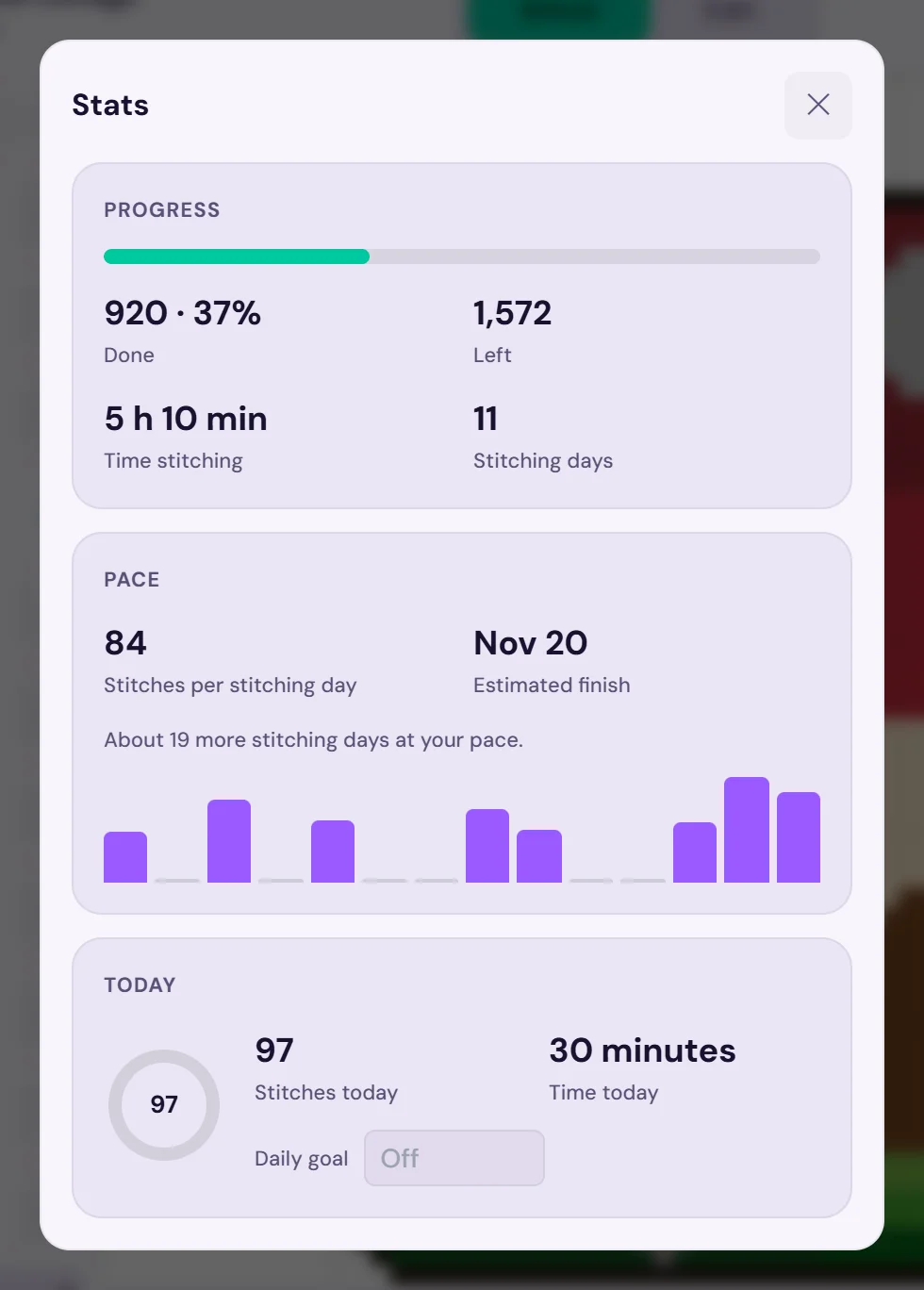
- Instead of the stitching log: time and stitches are recorded as you mark, and the finish date appears after two stitching days.
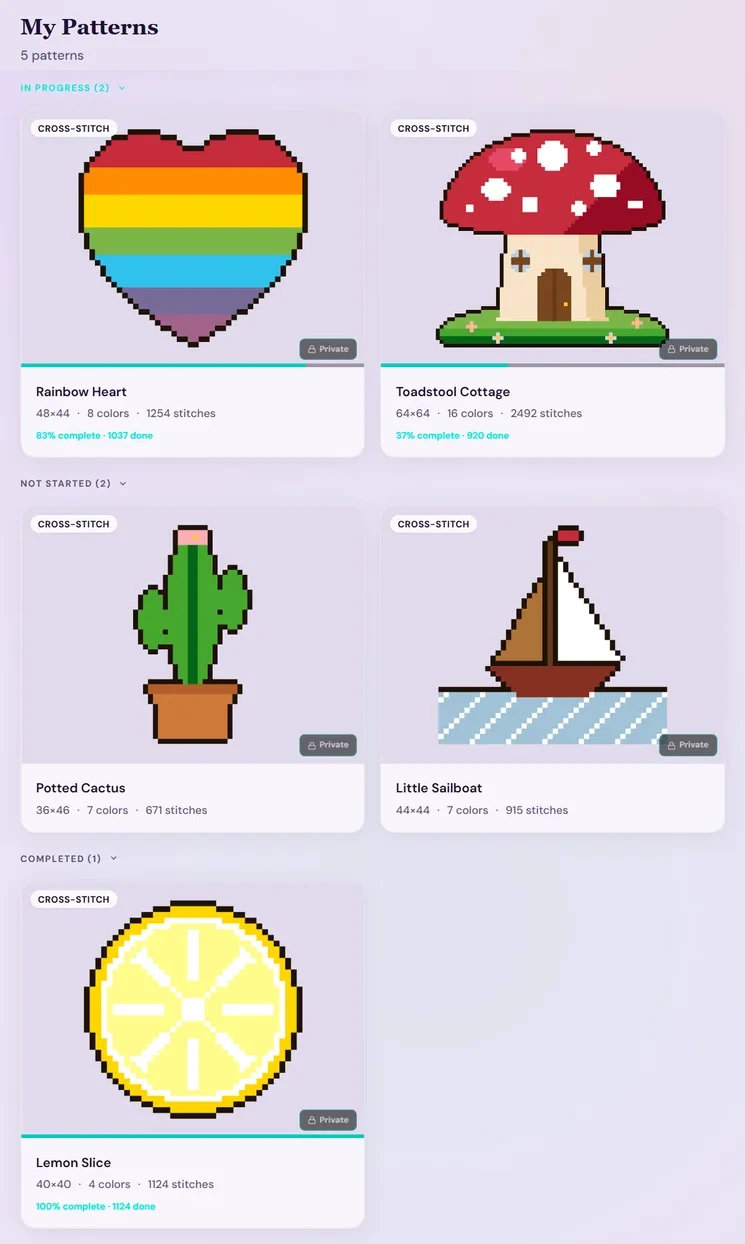
- Instead of the WIP list: My Patterns groups every chart into In progress, Not started and Completed, with progress bars.
- Instead of the floss sheet: the free floss stash tracker imports your thread list from a CSV or Excel file, or from photos of your skeins, keeps skein counts and where each thread is stored, and can deduct a pattern's floss when you finish it.
- On every device: phone, tablet or computer in the browser, with progress synced between them and offline stitching for saved patterns.
Bring the PDF or OXS charts you own (the free plan keeps 2 imported charts and 2 patterns in progress at a time; Stitch Tracker, $19.97 a year, lifts both limits), or make a pattern from a photo. See the cross stitch project tracker and the PDF pattern tracker for how it works.
Questions stitchers ask
Is the cross stitch tracker spreadsheet free?
Yes. Download the .xlsx or .csv file, no account or email needed, and use it for as many projects as you like.
Does it work in Google Sheets?
Yes. In Google Sheets choose File › Import › Upload and pick the .xlsx file. The formulas use only functions that Google Sheets, Excel and Numbers all support.
Can I use it as a cross stitch inventory spreadsheet?
Yes: the Floss inventory sheet lists each thread with skeins owned, skeins needed and a “To buy” column. If you’d rather not type every number, the free StitchThis floss stash tracker can import your thread list from a CSV or Excel file, or from photos of your skeins.
How does the spreadsheet estimate my finish date?
It divides the stitches left by your average stitches per stitching day, then spreads those stitching days over the number of days a week you say you stitch, and adds that to today.
How do I track more than one project?
Keep a row per project on the WIP list. For a full stitching log of a second project, duplicate the Project tracker sheet.
Is there an app that does this automatically?
Yes. The StitchThis progress tracker counts stitches as you mark them on the chart, and its Stats show your pace and an estimated finish date without any typing. It’s free for 2 patterns in progress at a time.