Which Cross Stitch PDFs Work With Tracker Apps (and Why Yours Won't Import)
Why a cross stitch PDF won't import into a tracker app: scans vs digital charts, symbols, legends, multi-page layouts, and what to do when yours fails.
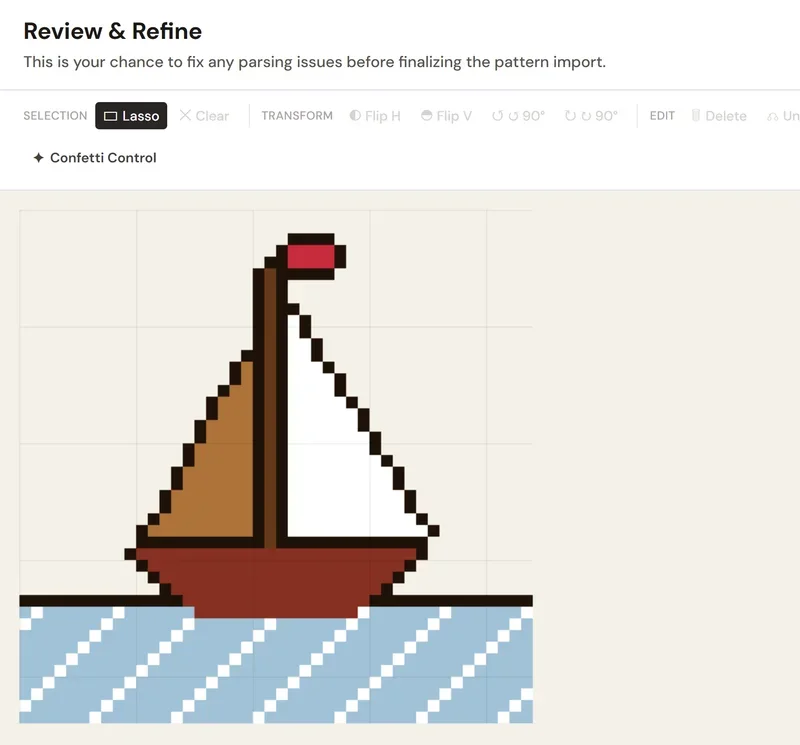
Quick answer: Tracker apps import cross stitch PDFs most reliably when they were made by charting software: a grid drawn as data, with symbols or colored squares and a key that names each thread. Scans and photos of paper charts are pictures; only some apps try to recognize their symbols. StitchThis shows you the imported chart before anything is saved, lets you fix anything misread in its editor, and keeps a PDF it can't read as a view-only copy. If yours fails everywhere, ask the designer for an OXS file.
PDF won't import into StitchThis? We'll work through it with you. If your file fails or the imported chart looks wrong, contact the StitchThis team and we'll look into it with you. Reports like yours are how the importer learns new chart layouts, and when a fix lands, a chart that failed before can be upgraded in place.
You bought a pattern, opened your tracker app, and got a message that no grid was found, or the import sat on "reading symbols" forever. Usually the cause is the file itself: how it was made, and whether its layout is one the importer knows. Sometimes it's the importer. This guide explains what's inside a cross stitch PDF, how to get a good idea in two minutes whether yours can be read, why symbols, legends and page layouts trip importers up, and what to do next.
Why some cross stitch PDFs import and others don't
A PDF can hold two very different things that look identical on screen:
- A digital (vector) chart. The designer's charting program wrote every square, grid line and symbol into the file as shapes and text. An importer can walk through that data and rebuild the chart: this cell is "▲", "▲" means DMC 310 in the key.
- A picture of a chart. A scan of a paper pattern, a phone photo saved as PDF, or a page flattened into one image. There are no cells or symbols in the file, only pixels. To read it, an app would have to recognize every tiny symbol by eye, on a page that may be tilted, blurred or shaded.
PDF importers that rebuild the chart from its data, StitchThis's and Pattern Keeper's among them, depend on the first kind. Pattern Keeper's own listing says scans and images can be used "only with limited functionality". A few apps take the harder route and try to recognize symbols in a picture: Markup R-XP, for example, says it reads photos and scans of paper, book and magazine charts, with a grid editor for crooked scans (according to its site, checked November 2026). Either way, most of the "why won't my pattern import" questions come down to the second kind, or to a digital chart laid out in a way the importer doesn't expect.
How to tell a digital PDF from a scanned one
You don't need special software. These checks give you strong clues rather than a definite answer: a digital chart can draw its symbols as shapes that don't select as text, and some scans carry a searchable text layer. Try them on a computer or tablet:
- Zoom way in. Zoom to 800% on a single symbol. A digital chart stays razor sharp at any zoom. A scan turns blocky or blurry, and you'll often see paper texture or gray speckles in the "white" squares.
- Try to select a symbol. Use the text-selection tool and drag across a row of the chart. If the symbols highlight as text, the chart is almost certainly digital. If the whole page highlights as one block, or nothing highlights, it's probably an image, or a digital chart with symbols drawn as shapes.
- Search for a symbol. Press Ctrl+F (Cmd+F on a Mac) and search for a letter or number you can see on the chart. Hits on the chart usually mean real text.
- Look at the page edges. Slightly crooked grid lines, shadows near the binding, or a gray border are tell-tale signs of a scanner.
- Check the document properties. In your PDF reader's Properties, the "Application" or "PDF Producer" field often names the program that made the file. A charting program's name is a good sign; a scanner or a scanning app is not.
Older patterns from magazines, leaflets and out-of-print books are almost always scans, even when you bought them as a PDF. Charts bought recently from independent designers are almost always digital.
Symbol charts vs color-block charts
Digital charts come in a few styles, and importers handle them differently:
- Symbol charts print a symbol in each square, sometimes on a colored background. The symbol is the thread's identity, and the key ties each symbol to a thread number. These are the most reliable to import, because there's no guessing: the symbol says which thread it is.
- Color-block charts fill each square with color and no symbol. An importer has to match each fill color to a thread, which works well when every thread has a distinct color and less well when two shades of beige sit side by side.
- Charts printed more than once. Some programs print the same chart page three times: once in color, once in black-and-white symbols, and once with both. An importer that doesn't notice this can stack the copies into one very tall chart.
If you'd like to understand what all those symbols and lines mean when you read a chart by hand, the cross stitch symbols and notation guide covers it.
The legend (key) matters more than you think
The key is the table that says "▲ = DMC 310 Black, 1,240 stitches". Without it, an importer knows a cell has a "▲" but not which floss it is. Common problems:
- No key in the file. Some designers ship the key as a separate PDF or print it only in a printed booklet.
- A key in an unexpected language or layout. Column headings like "Symbol / Number / Name" are read easily; an unusual layout may not be.
- Brands the importer doesn't know. Hand-dyed threads, discontinued numbers and blended threads ("one strand of 310 and one of 3799") all need special handling.
- Symbols drawn as pictures inside the key. If the key's symbols aren't text, the importer can't match them to the chart.
A good importer refuses to guess thread colors when there's no key, because a chart with invented threads is worse than no chart at all.
Multi-page charts, overlaps and page layout
Most charts bigger than about 60 × 80 stitches are split across pages, usually with a few rows repeated at each edge so you can line them up. An importer has to work out where each page sits and remove those repeated rows, or your chart comes out with doubled strips at every seam. Charts that put pages in an unusual order, rotate a page, or print the overview "map" of pages at chart size can confuse this step.
Stitching on paper instead? Our guide to assembling a multi-page cross stitch PDF covers trimming, overlaps and alignment.
Backstitch, fractional stitches and specialty stitches
This is where most tracker apps stop, and it's worth knowing before you buy one:
- Pattern Keeper: its own FAQ says it currently supports only full cross stitches; backstitch and fractional stitches are "on the wish list", and its Play listing says they aren't supported (checked November 2026). Release notes for a late-2025 beta mention tentative support for fractional stitches.
- Markup R-XP: its guide says backstitch, French knots, beads and fractional stitches aren't tracked as symbols; you draw them on separate layers, with lines that snap to the grid.
- StitchThis: the PDF importer also reads full stitches only. Backstitch lines and fractional stitches in a PDF aren't brought in, so keep the original PDF handy for those parts. OXS files are different: an OXS import brings in backstitch and quarter and three-quarter stitches (a lone half stitch comes in as a full stitch of its color).
French knots, beads and specialty stitches aren't imported from a PDF by any of them.
What the StitchThis importer reads
StitchThis's PDF importer tries several readers in turn, each built for a different way charts are drawn, and keeps the first one that produces a sensible chart. In practice that covers:
- Symbol charts with a key, including charts that combine symbols with colored squares. The key gives the exact thread numbers.
- Color-block charts, matched to threads by color.
- Charts exported from common charting programs. The importer has specific handling for charts from WinStitch (including its color / symbol / both copies of each page), Stitchly (including its "Pattern Keeper PDF" export), Stitch Fiddle, Cross Stitch Pro, cross-stitch.com and Pic2Pat, DMC's free pattern PDFs, and the many designer charts that print column numbers across the top of each page.
- Charts split across pages, joined into one, with repeated overlap rows removed.
- Blended threads read as one combined thread, hand-dyed brands such as Weeks Dye Works and The Gentle Art kept with their real codes and names, and discontinued DMC numbers resolved to their substitutes.
- Some charts drawn as one clean image of colored squares, read by color.
The limits, plainly:
- Scans and photos of paper charts can't be read stitch by stitch. (Some apps, such as Markup R-XP, recognize symbols in scans; StitchThis doesn't.)
- Full stitches only from PDFs (see above). OXS imports keep backstitch and quarter and three-quarter stitches.
- Size: PDF and OXS charts import up to 600 × 600 stitches on the free plan and 1000 × 1000 on Maker. A few PDF layouts are read only up to 500 × 500.
- No key, no guessing. A symbol chart with no key in the file is refused with an explanation rather than filled with made-up threads.
- Files up to 25 MB and 250 pages.
When a PDF can't be read, you still keep it
If no reader can handle your file, StitchThis keeps it as a view-only PDF in your library and tells you why in plain words: a scanned image, no chart found, a layout it can't read yet, no color key, or a file that won't open (damaged or password-protected). View-only PDFs never count toward the free plan's imported-chart limit.
The review step: check it before it's saved
Nothing is saved until you've seen it. After the import, the Review & Refine screen shows the chart that was read, so you can compare it with the PDF. You can select an area and move, flip, rotate or clear it (handy for a misplaced strip at a page seam), undo and redo, and run Confetti Control, which finds lone stitches that blend into their neighbors and suggests swaps, one color at a time. Then save it to your library, or discard it.
After the import: the rest of the hobby
Once it's saved, the chart is part of everything else in StitchThis:
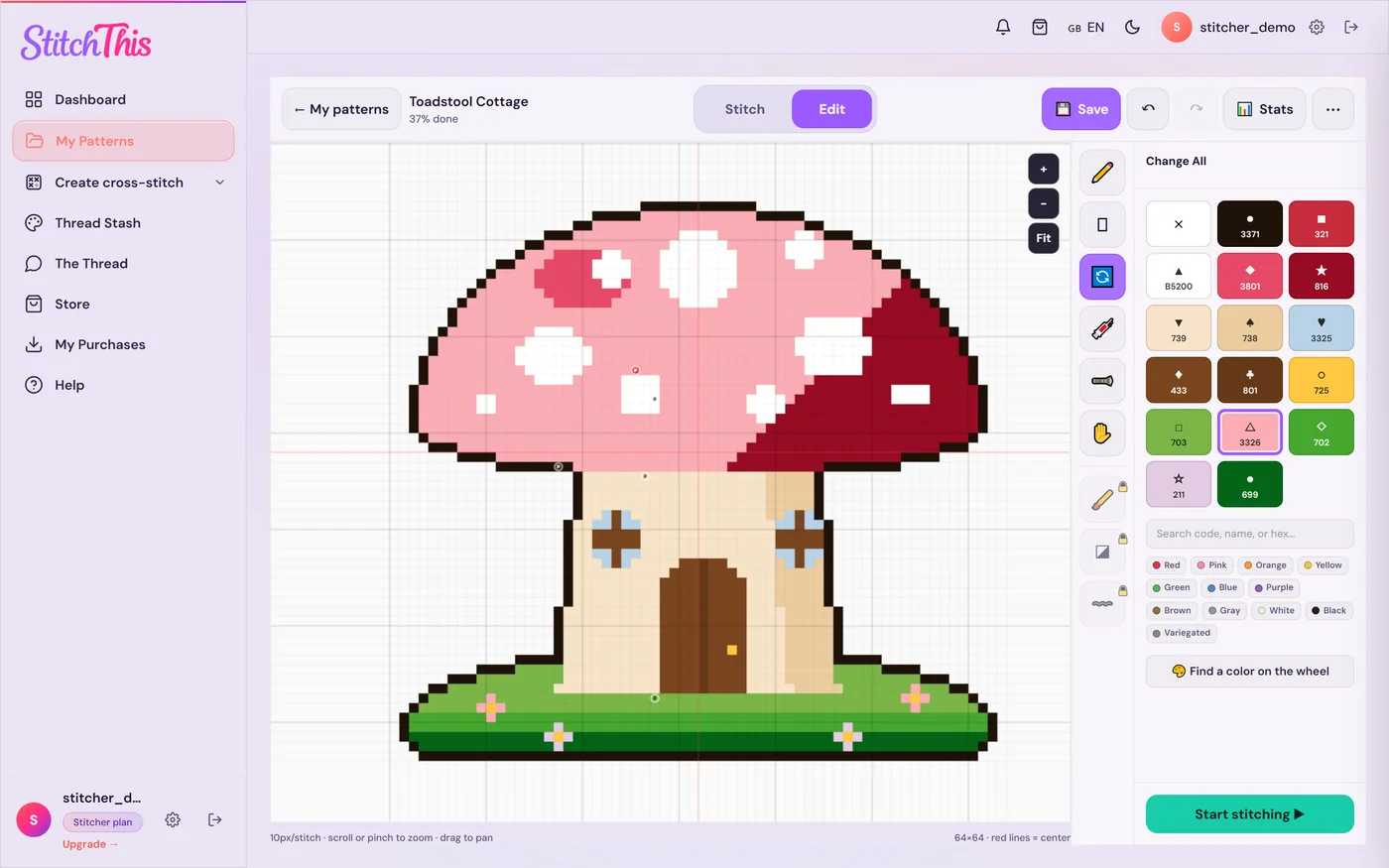
- Fix what the importer missed. Edit mode works on imported charts: Change All swaps every stitch of one color for another, Fill recolors an area, and Draw fixes single stitches. Handy too when the chart calls for a thread you don't own.
- Stitch it on any device. The PDF pattern tracker runs in the browser on iPad, iPhone, PC, Mac, Chromebook and Android, and every stitch syncs to your account. Highlight one thread and the rest gray out, park needles, and watch your pace and finish date.
- Keep it with everything else. My Patterns groups it with your other projects by status, the floss stash tracker keeps your threads, and the community forum is there when a chart has you stuck.
Try StitchThis free with your own PDF; the free plan keeps 2 imported charts at a time.
"Pattern Keeper not recognizing symbols", "no grids found" and "stuck on reading symbols"
These are the import problems Pattern Keeper users search for most. Its own pages (checked November 2026) point to the same causes as any tracker:
- The designer isn't on its list. Pattern Keeper keeps a supported designers list and says it works with many, but not all, designers.
- The symbols aren't text. Its designer guide asks for symbols exported as a font; if you can't select a symbol in your PDF reader, an importer often can't match it.
- Extra pages look like a chart. A cover, an alphabet or an overview page can confuse grid detection; its import help has you delete extra grids by hand.
- It's a scan. Pattern Keeper imports photos of paper charts only with limited features.
The exact messages ("no grids found", "stuck on reading symbols") don't appear on its help pages, so go by the cause. Pattern Keeper is also Android only; if you're on an iPad, iPhone or computer, see Pattern Keeper alternatives.
What to do when a cross stitch PDF won't import
Work down this list:
- Run the two-minute checks (zoom and select). If it looks like a scan, skip to step 6.
- Look for a second file in your download. Designers often include a separate key, a "PK-compatible" version, or an OXS file. Check the shop listing and the download email too.
- Ask the designer for an OXS file or a tracker-compatible PDF. Many designers will send one if you ask politely with your order number. OXS is the most dependable format for importing, and it keeps backstitch. Our pattern file formats guide explains OXS, PDF and the rest.
- Contact the StitchThis team. If the file fails in StitchThis, or the chart comes in wrong, tell us and we'll look into it with you. A failed import costs you nothing in the meantime: the PDF is kept as view-only and doesn't use a free slot.
- Try a different app. Importers read charts differently; a chart one rejects, another may read.
- For a scan, stitch from the view-only PDF or paper. Mark progress with a highlighter or a block map, as in our guide to tracking cross stitch progress. You can also turn a screenshot of a simple chart into a new pattern with a photo-to-pattern tool, but that makes a new, approximate chart, not the designer's: fine for a simple motif, risky for a detailed one.
- Still stuck? Here's how to ask for help with a cross stitch pattern so you get a useful answer fast.
Designers reading this: the same habits that make a chart easy to import also make it easy to stitch. See cross stitch pattern PDF best practices: symbols as text, a complete key in the same file, and consistent page overlaps.
A quick compatibility checklist
| Check (clues, not proof) | Good sign | Bad sign |
|---|---|---|
| Zoom to 800% | Crisp edges | Blocky, blurry, paper texture |
| Select a symbol | Highlights as text | Whole page selects, or nothing |
| Ctrl+F for a symbol | Finds hits on the chart | No hits |
| Key | In the same file, with thread numbers | Missing, or a separate file |
| Pages | Upright, consistent overlaps | Rotated pages, chart-size overview map |
| Stitches | Mostly full crosses | Heavy backstitch and fractionals (keep the PDF for those) |
Frequently asked questions
Why is Pattern Keeper not recognizing symbols in my PDF? Usually because the symbols aren't text. Pattern Keeper's export guide asks designers to export symbols as a TTF font; if you can't select a symbol in your PDF reader, the app often can't read it either. If StitchThis can't read it, contact us and we'll look into it with you. Scanned charts have the same problem. Ask the designer for a "Pattern Keeper compatible" PDF.
What does "no grids found" mean in a cross stitch tracker app? The app couldn't find a stitch grid it recognizes. Common causes: the page is a scanned image, the grid is part of a picture, or the layout (page size, rotation, an overview page) isn't what the detector expects. Pattern Keeper's help says you can add or edit grids by hand when it can't read them automatically.
Why is my pattern stuck on "reading symbols"? Very large charts, many pages, or symbols the app can't match can make an import slow or stall. Check whether the PDF is digital, close other apps, and if it still stalls, ask the designer for a compatible PDF or OXS file.
Which patterns are compatible with Pattern Keeper? Pattern Keeper lists supported designers on its site and says it works with many, but not all, designers. Charts exported from charting programs with symbols as text, a complete key and standard page layouts have the best chance; scans work only with limited features.
Can a tracker app read a scanned cross stitch pattern? It depends on the app. A scan is a picture with no chart data in it, so the app has to recognize every symbol by eye. Markup R-XP says it reads scans and photos of paper charts; Pattern Keeper imports a photo of a paper chart with limited features (no symbol search). In StitchThis a scanned PDF is kept as a view-only PDF you can open, but it isn't converted.
Do backstitch and fractional stitches import from a PDF? Not in StitchThis, and not in Pattern Keeper according to its FAQ: both read full stitches from PDFs. In StitchThis, an OXS file keeps backstitch and quarter and three-quarter stitches.
How do I tell if a cross stitch PDF is vector or a scan? Zoom to 800% (vector stays sharp), try to select a symbol (vector symbols usually select as text), and search for a symbol with Ctrl+F. Treat these as strong clues, not proof: some digital charts draw symbols as shapes, and some scans include a searchable text layer.
What should I ask the designer for? An OXS file, or a PDF exported for tracker apps (often labeled "PK-compatible"). Include your order number.
Make the most of the charts you own
Most digital charts from current designers import cleanly, and knowing the difference between a chart and a picture of one saves a lot of frustration. Once your chart is in, the cross stitch project tracker keeps every pattern and its progress in one library, and the cross stitch parking method guide helps with the big full-coverage ones. On a computer or tablet? See the cross stitch tracker for PC and for iPad pages, the iPad cross stitch software roundup, and our guide to organizing your cross stitch patterns. Busy confetti charts get easier with the tips in how to read confetti-heavy patterns.
Got a PDF waiting? Import it free in StitchThis and see it on the review screen in a minute or two.
Already have a chart as a PDF?
Upload it to StitchThis and stitch from it on screen: zoom in on any section, mark stitches as you go, and pick up where you left off.
Import your PDF freeFree plan: keep 2 imported charts and track 2 patterns at a time, with no time limit. No card required.